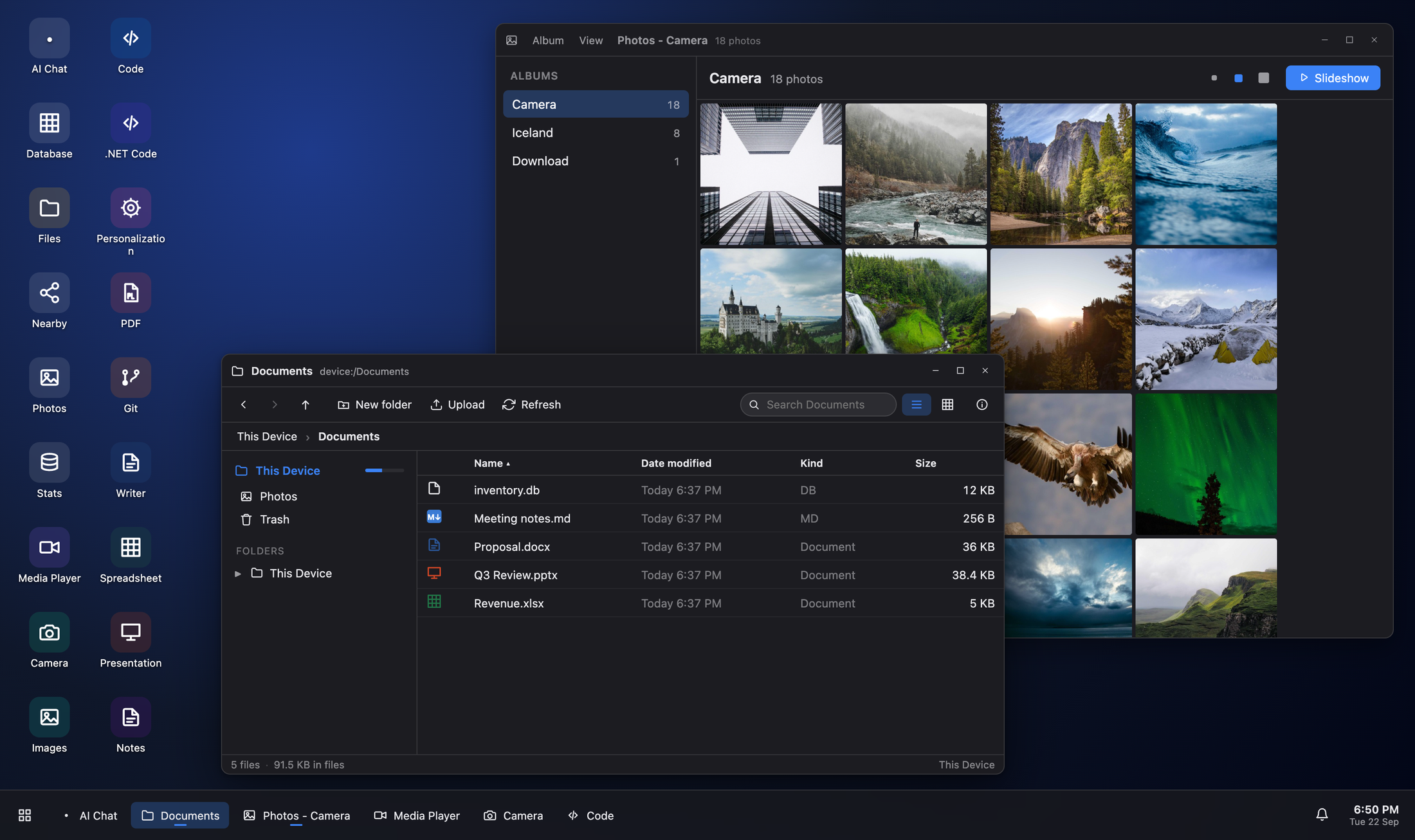
Device Cloud turns a phone, tablet or desktop into a small personal file server — and serves
a whole desktop around your files: code and git, databases, documents, AI chat, your old
games and the phone's own camera. To the browser on the device, to the local network, and
through a zero-account tunnel to anywhere on the internet. Then the phone in your hand
becomes the remote.
One address per reach. Nothing beyond the first one is on until you turn it on.
Four people this was built for
Each one is the same trick: the machine that has your files and does your work is
already in your pocket, and the screen in front of you only has to be a window.
For the software engineer · anywhere
Your code, your repos and your databases — from a browser, with nothing installed
The laptop is at home, or in the hold, or on a desk you are not sitting at.
The phone in your pocket is already running the editor, the git
implementation, the C# compiler and the database connections, so the borrowed
screen in front of you does not have to run any of it. Open the address and
you have your desk.
And you sign in to your device, never to GitHub or to the database.
Git tokens and database passwords stay in the phone's keychain; the browser
only ever names an account. Pull from a private repository or query a
production replica on a machine you would not type a password into — and
when you walk away there is nothing on it to clean up.
C# in the browser: IntelliSense across the whole solution, then Build and Run with Roslyn — no SDK on the machine in front of you
A NuGet package manager, with restore on the device and private feeds whose credentials stay in its keychain
Clone, stage by hunk, commit, rebase and push — git written from scratch, running on the phone, on files that never leave it
SQL Server and PostgreSQL as well as SQLite: the device makes the connection, so any browser gets a query editor, Explain and editable tables without a database client
TLS required by default; trusting a server's certificate is a box you tick, not a default you inherit
AI Chat with OpenAI, Azure OpenAI, Anthropic or a local model server — run by the device, with your mapped folders as the model's tools and the API key in the keychain
For sales and business on the go · anywhere
The deck, the proposal and the numbers, on whatever screen is in the room
A hotel business centre, a client's meeting room, a tablet borrowed from a
colleague. Your documents are on your phone, and the phone serves them into
a desktop in the browser — Word, Excel and PowerPoint open, edit and save
right there. Nothing is copied onto the machine you borrowed, and nothing is
left behind on it.
Then start the slide show and put the laptop down. The deck is on the wall,
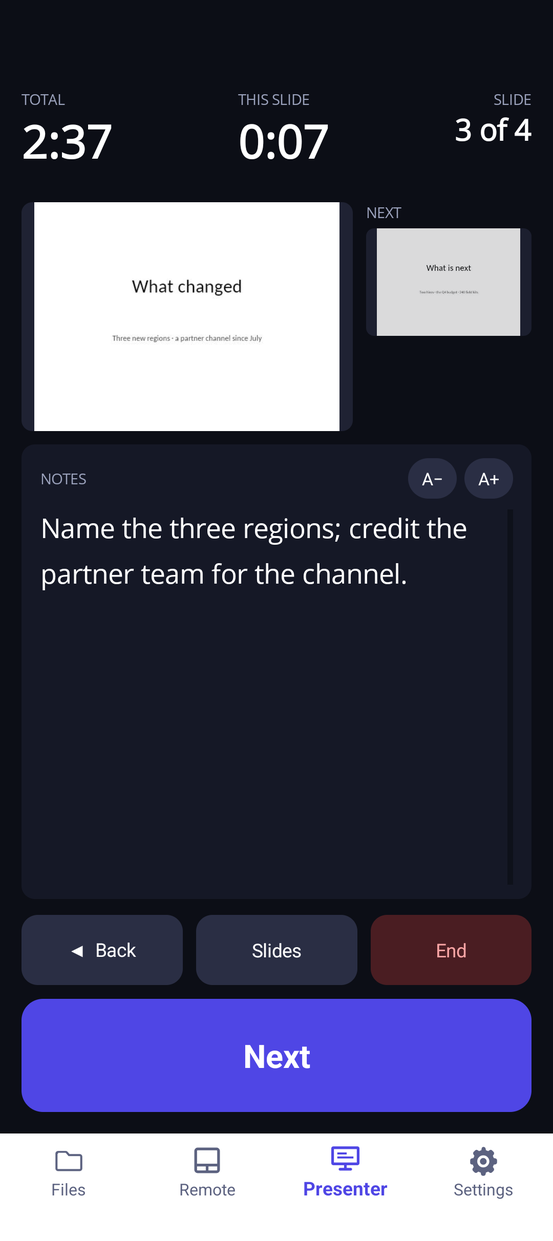
and your notes, the clock and the next slide are in your hand.
Writer, Spreadsheet and Presentation open, edit and save .docx, .xlsx and .pptx — or start a new one
Saved back surgically: the parts of the file you did not touch survive byte-identical
Notes for free-form pages and ink, a PDF viewer, and search that looks inside files
A public https:// address and a QR code for it, with no account anywhere — a borrowed screen is one scan away
Anything sent to Device Cloud from the phone's share sheet lands in Inbox, ready for the meeting
A presenter's view on your phone: the slide's notes, a clock for the talk and one for the slide, the next slide, and Back and Next — while the deck plays on the room's screen
The phone is also a touchpad and keyboard for the desktop on that screen, and on iPhone the whole desktop can go to the TV over AirPlay
For the retro gamer · same network, or anywhere
Your cartridges, on any screen. Your saves go with you.
The games you own are files on your phone. Games turns them into a library of
box art, and any browser that reaches the device plays them — the laptop in
the hotel, a laptop plugged into the TV, a tablet on the couch — with a controller in
your hand and nothing installed.
Every other browser emulator keeps your saves in that browser, gone with the
profile. Here the battery saves and save states live on the device, so the
game you saved on one screen picks up on the next. No controller with you?
The phone is one — a pad drawn like the console you are playing, rumble
included.
NES, SNES, Game Boy and Game Boy Color, Game Boy Advance, Genesis / Mega Drive, TurboGrafx-16 and Nintendo 64
Add a folder from the file manager; the device identifies each ROM from its header and fetches its box art once, for every browser
A Bluetooth or USB controller plays the game and drives the library; the keyboard works too
Or use the phone as the controller: NES, SNES, Game Boy, Genesis and N64 layouts, multi-touch, with the game's rumble on the phone's motor
The emulator cores ship inside the app, so playing needs no internet at all
Off until you switch Games on, and bring your own games. The phone controller drives a game on another screen; a phone's own browser still needs a paired controller
For the photographer · same network
The iPhone is on the tripod. The shoot is on a real desktop.
Team photos in a school gym, a club's whole roster, a hall of people who each
get ninety seconds. The phone goes on the mount pointed at the riser — which
is the exact moment its own screen stops being any use to the person pressing
the shutter. Photographer mode makes every other screen the viewfinder: a
laptop on the table gets the live preview, the shutter, video, the lens, zoom,
the torch and the filters.
Every picture lands in a folder on the same device everyone is already
connected to, the moment the shutter is pressed. Then sort the shoot where
sorting is easy: tiles and thumbnails, multi-select, move, zip, and an image
editor in the browser. No card, no cable, no import.
More than one screen can watch and drive it; the controls follow the device, so two people cannot undo each other
Ask the device to open its camera from the remote screen, because "go and open the Camera tab" is advice nobody at a tripod can take
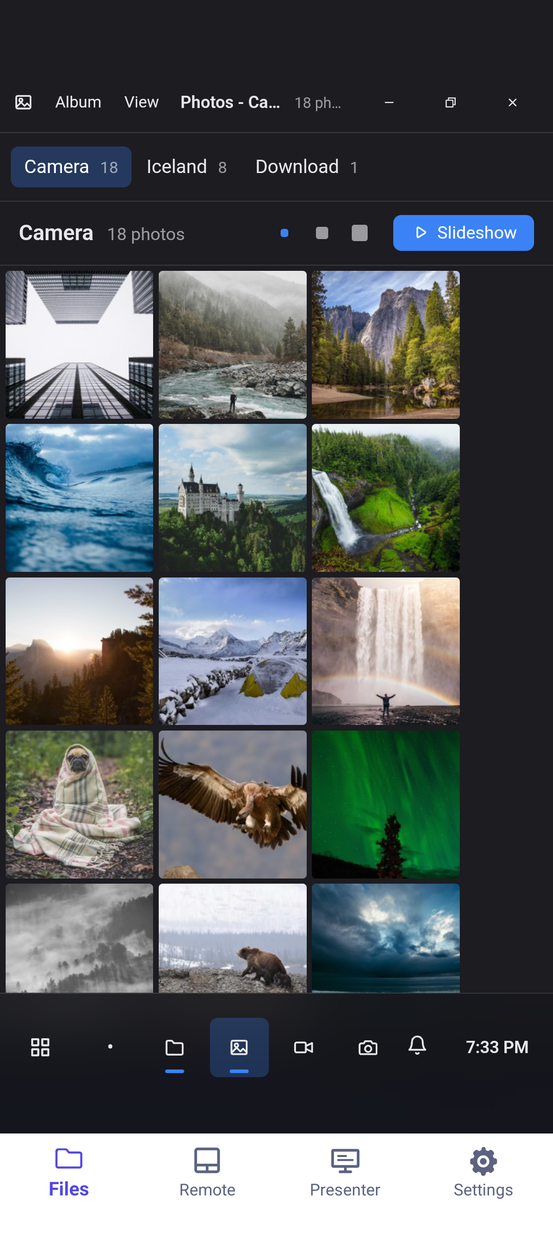
Photos, a gallery over the phone's library: albums, a zooming full-screen viewer and a slideshow, in any browser — and "Edit" hands a picture to the image editor
The photo library is a folder too, one album each, and HEIC comes out as JPEG so it opens in any browser
Crop, rotate, draw, add text and export in the browser, saved straight back to the device
Off until you turn it on, and it stays off until the system grants the camera too
The same desktop, on the phone and in a browser across the room
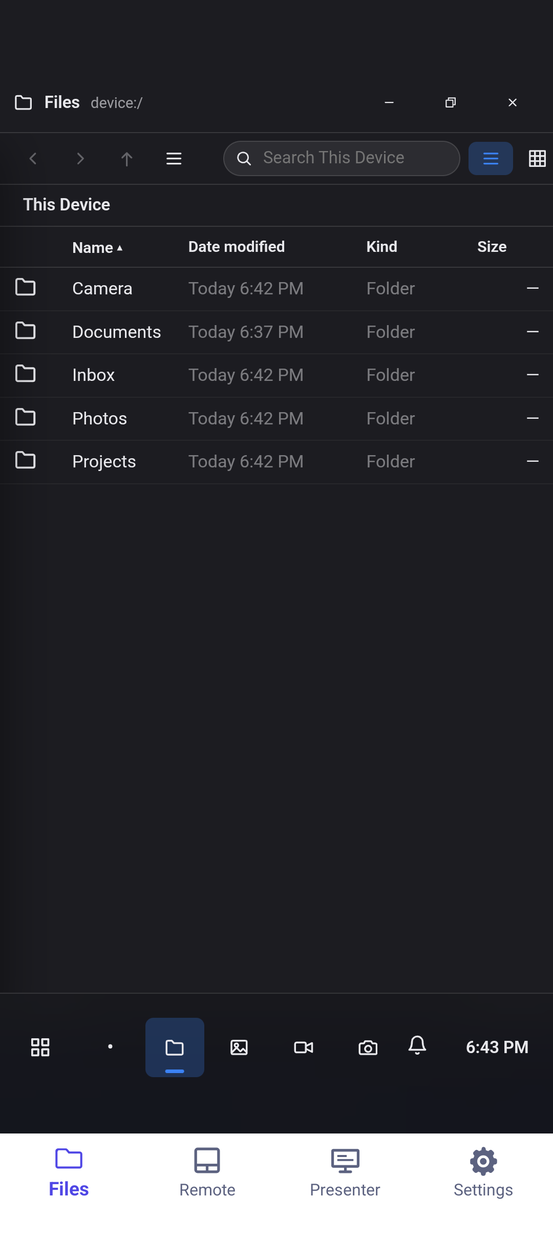
One address, one desktop. A browser with room gets windows, a taskbar and a launcher;
on a phone the same desktop keeps every window full screen and re-fits it when the
device turns. And while a browser has it open, the phone in your hand is its remote.
http://192.168.1.24:8080/
Files, on the device
Photos, from the library
Your notes, while the deck is on the wall
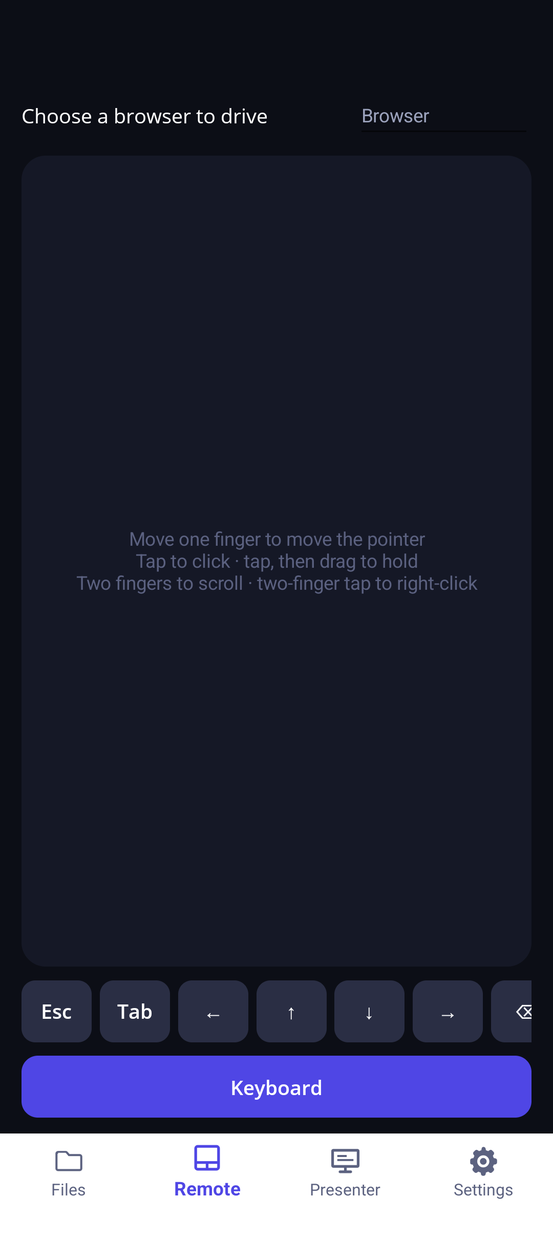
A touchpad for the screen across the room
Seven ways in, and you decide how many are open
The server binds to loopback until you say otherwise, and nothing off the device is served
until a username and password are set. Every route past the first one is a switch you throw.
On the device
The app itself
Nothing to set up. The Files tab is a WebView on the loopback server — the same client every other device gets.
On the device
The platform's file manager
Nothing to set up. On My iPhone → DeviceCloud in Files, or DeviceCloud in the Android picker.
On the device
The share sheet
Send a file to Device Cloud from anywhere on the phone. It lands in Inbox and opens where it is best read.
Same network
Another device on this wifi
A password, then Share on this network. Announced over Bonjour as _devicecloud._tcp.
Same network
A drive in Finder or Explorer
Turn on Open as a network drive and mount /dav with the same password. Everything the Files app shows, as a disk — through the tunnel too, inside https. Off again every launch.
Anywhere
The public internet
A password, then Public tunnel. You get a public https:// address and a QR code for it. No account anywhere.
Same room
No network at all
Bluetooth, one file at a time, accepted by hand at the other end. Nothing moves until the other device says yes.
A file server, and then everything you would want to do with the files
There is exactly one file-management UI. What you see standing at the device is what a
visitor on the other side of the tunnel sees.
The workspace
Monaco, a lazy file tree, and tabs that each keep their own undo stack, language and view state. A scratch buffer is open on arrival, so it is somewhere to type before it is somewhere to open a file.
Files
Listings, breadcrumbs, upload, download, rename, and a trash you can turn off if a delete should just be a delete. Cut, copy, move, zip or share several at once. Zip archives open as folders you walk into.
Search, as two questions
What you are looking for — names, and the text inside files — is asked apart from where to look. That is what lets "*.cs files containing TODO" be a search, which one box cannot express.
One desktop, every screen
Windows, a taskbar and a launcher in any browser. Under 640×480 every window stays maximised and re-fits when a phone turns or a foldable opens — so there is no second, smaller product to fall back to.
A desktop that follows you
The theme, the wallpaper, the taskbar and each app's settings are kept by the device, not by the browser — so every screen that opens the address opens your desktop, and a backup carries it. Window layouts stay with the screen they belong to.
A network drive
Mount the device in Finder, Explorer or any WebDAV client — mapped folders and the photo library included, read-only mappings still read-only. Deletes go to the device's trash. On for this run of the app only.
C# that builds in the browser
Open a .sln or .slnx and get completion, hover, signature help, go to definition, rename and squiggles across the whole solution. Build every target framework and Run console code — Roslyn in Web Workers, no SDK installed.
Word, Excel, PowerPoint
Opened, rendered and edited in the browser — or started new — then saved back surgically, so the parts of the package you did not touch survive byte-identical. Notes adds free-form pages and ink.
NuGet, restored on the device
Search, install, update and remove packages from .NET Code. Restore honours the repository's nuget.config, source generators run — the framework's, Razor's and every package's — and a private feed's credentials stay in the device keychain.
SQLite, opened onto its tables
Schema, keys and indexes, rows edited in place, and a query pane with results in a grid. Everything runs on the device against the file where it lies — a database is never downloaded to be read.
SQL Server and PostgreSQL, from the device
A browser cannot open a database socket, so the device does. Saved connections live on it with their passwords in its keychain — never in the browser — and you get schemas, a query editor with tabs, Explain, and cells you can edit on any table with a primary key. TLS required unless you say otherwise.
AI Chat, run by the device
OpenAI, Azure OpenAI, Anthropic, or anything that speaks the OpenAI protocol — LM Studio, Ollama. The key stays in the keychain, the reply belongs to the device so closing the window does not lose it, and the model's tools read and write your mapped folders only.
A DDL designer that does not run
Creating a table, dropping a column, changing a type — each ends as a statement in the query window with Run beside it. Seeing the script is the difference between changing a column and hoping.
Git, written from scratch
Objects, refs, the index, diff, merge, smart-HTTP transport and submodules, in managed C#. libgit2 P/Invokes native code and does not survive iOS Native AOT, so there is no version of this that is a binding.
Every git operation you reach for
Clone, stage and unstage by file or by hunk, diff, commit and amend, log, branches, merge, fetch, pull, push, rebase, cherry-pick, revert — with continue, skip and abort for the ones that stop — stash, blame and submodules.
Accounts that stay signed in
GitHub, GitLab, Azure DevOps, Gitea and anything else. The token goes to the keychain and never into the database, which is why a restored device keeps its accounts and has to sign in to them again.
Ahead and behind, kept true
Remotes are reached in the background on each repository's own cooldown, not the last time somebody pressed Fetch. A remote that cannot be reached is a timestamp that does not move, rather than an error on the screen.
A game library, and saves that travel
NES, SNES, Game Boy, GBA, Genesis, TurboGrafx-16 and N64 ROMs on the device become a box-art grid any browser can play, with a controller or the keyboard. Battery saves and four state slots live on the device, not in one browser. Off until you switch Games on.
The phone is the remote
A touchpad and keyboard for the desktop on the TV, a game pad drawn like the console you are playing — the browser sees one more gamepad, rumble included — and a presenter's view with notes, clocks and the next slide. The phone's input goes to that one browser tab and nowhere else.
The desktop on the TV, over AirPlay
On iPhone and iPad, mirror to an Apple TV and the TV shows the whole desktop instead of a copy of the phone's screen — and the Remote tab drives it. Behind its own switch; off, mirroring is ordinary mirroring.
The device's camera, on another screen
Photographer mode puts the viewfinder, shutter, video, lens, zoom, torch and filters in a browser across the room, and files every capture on the device as it is taken. Separately, a Webcam app saves from the viewing computer's own camera — on HTTPS or localhost, as browsers require.
A desktop from another era
Personalization dresses the whole desktop — chrome, wallpaper and sounds — as a DOS prompt, early Windows or a classic Mac, alongside Dark, Light and High Contrast. Every app follows the theme.
Mapped folders
Folders elsewhere on the device — a Documents folder, an external drive, a project tree, iCloud Drive — served without anything being copied in, and read-only if you want. Unmapping deletes nothing.
Photos, from the phone's library
A gallery app with your albums, a zooming full-screen viewer and a slideshow — and the same library as a folder in Files, nothing copied. Everything comes out as JPEG, so HEIC opens in any browser, and a tile asks for the size it is going to draw, not a twelve-megapixel original.
Nearby sharing over Bluetooth
Hand a file to a Device Cloud device in the same room with no network involved. The other end sees who is sending, the name and the size — and the radio advertises nothing until you turn listening on.
Drag straight onto the window
On desktop, a file dragged from Finder, Explorer or Files lands in the folder you are standing in. The drag is claimed at the window and uploaded in-process, so a half-gigabyte video never goes through a WebView's heap.
Backup that rebuilds, not remembers
On Apple platforms the document database snapshots to your private iCloud container minutes after a change. A linked repository's history travels as a git packfile, so a restore rebuilds the clone rather than remembering its name.
What is actually stored
Stats walks everything the device serves and says where the space went: by kind, by folder, the biggest files, the trash, the app's own data and each mapped folder's free space — with a way to open any of it in Files.
Diagnostics you switch on
An optional record of what was created, changed and read. An optional recording of every request the server answered — both sides, headers and bodies — held in memory only, never written down, and off again every launch.
Still serving when you look away
The server keeps running when the app is not in front. Desktop heads add a status-bar item, because the useful state of a desktop file server is "is it serving, and at what address" — which is exactly what a minimised window hides.
One table decides what a file opens into
So the listing, the workspace and the viewer page cannot disagree about it.
File
What opens it
Source, markup, notes
The Monaco editor. Markdown and HTML add a live preview beside what you are typing
Images
A zooming viewer, and an editor — crop, rotate, draw, text annotations, undo/redo, export
Audio and video
A player with a transport bar that knows a sound file has no picture to go full screen with
PDF
Rendered page-at-a-time onto a canvas by a bundled pdf.js, because the Android WebView has no PDF engine of its own
Solutions and C#
.sln and .slnx open in .NET Code, with IntelliSense, Build and Run — Roslyn in the page, nothing installed
SQLite
Tables, schema, editable rows and a query pane. The one opener that never reads the file in the browser — the query runs on the device
Word, Excel, PowerPoint
Opened, rendered and edited in the browser, saved back surgically so untouched parts of the package survive byte-identical
Game ROMs
Added to the game library from the file manager, and played in a window or full screen — when Games is switched on
Anything else
The only honest offer, which is a download
Sharing is always a deliberate act
Every way off the device is a switch, and every switch starts off. Throw one and see.
Off unless you turn it on
Share on this network
Needs a password first
Public tunnel
A public https:// address and a QR code
Open as a network drive
Off again every launch
Use this phone as a remote
Only the browser that claims it hears it
Nearby listening
Starts off every launch, every time
Photographer mode
And then the system's camera permission
Games
No app in the launcher until it is on
Writing to the photo library
A separate permission from reading it
Serve on loopback
The device's own Files tab
Loopback until you say otherwise. The server binds to the device alone until Share on this network or the tunnel is turned on.
No password, nothing served. Nothing off the device is answered until one is set — and the check lives on the server, not in the UI.
Sessions you can end. Visitors sign in and carry a cookie; Remember me keeps it 30 days, and changing the username or password ends every remembered session at once.
The owner is never challenged. The device's own Files tab is not asked for credentials. It is already inside.
Git off means 404. While git is off the Git app says so and every /api/git route refuses — including to someone holding a share link. Hiding a link is presentation, not a permission.
Secrets live in the keychain. Git tokens, database passwords, AI provider keys, NuGet feed credentials and the server password are in the platform keychain, not in the settings file and not in the database — and never sent to the browser.
Guessing is slow, and visitors are news. Repeated wrong passwords are throttled, and a new address arriving through the tunnel is a notification on the device.
Every incoming file is a question. A nearby transfer is accepted by hand at your end before a byte moves.
One app, one client, every screen
There is no separate web product and no separate phone product. The client that
ships inside the app is the client a visitor gets on the other side of the tunnel —
so what you see standing at the device is exactly what you are handing out.
Inside the app
runtime.NET 10, AOT- and trim-clean throughout
serverAn HTTP server embedded in the app, bound to loopback until you say otherwise
clientBlazor WebAssembly, published, zipped and embedded — then served to every visitor, the device included
gitWritten from scratch in managed C#. No native dependency, so it survives iOS Native AOT
c#Roslyn in two Web Workers — one to run, one for IntelliSense and builds
databasesSQLite, and SQL Server and PostgreSQL through SqlClient and Npgsql on the device
aiMicrosoft.Extensions.AI on the device — the browser never holds a key or calls a provider
driveWebDAV at /dav, through the same storage rules as the Files app
gameslibretro cores carried in the app and served by the device, so play needs no internet
filesThe app's own folder, folders mapped from elsewhere on the device, and the photo library
remoteA websocket from the phone's Remote, Controller and Presenter tabs to one browser tab, checked by origin
nearbyBluetooth, one file at a time, accepted by hand at the other end
On your phone today, on your desk shortly
The phone heads and the desktop heads are the same application. What differs between
one platform's build and another's is the entry point, the manifest and the icon.